

If you buy a car in India, most probably, you’ll come across a Tax Collected at Source (TCS) addition to the overall cost of the vehicle. TCS is an amount collected on behalf of the government by the car dealers if the purchase price exceeds certain limits. Although you may end up paying more for the upfront cost with TCS, you are eligible to claim some or all of it when filing your income tax return.
Are you wondering how to claim TCS refund on car purchase? Let this guide be of great importance in meeting your answers through detailed step-by-step processes. Even understanding TCS on car purchases down to the documentation needed for filing your claim, we have got you covered.
What is TCS on Car Purchases?
How to claim TCS refund on car purchase? Tax collected at source (TCS) is the tax to be collected by the seller, in this case the car dealer on behalf of the government. For the time being, the TCS will come into effect if the value of your car is more than ₹ 10 lakh. The TCS paid will be at a rate of 1% of the total sale amount and will be deposited by the car dealer with the government under your PAN.
The amount gets credited towards your tax account; you will be liable for a refund where there has been an overpayment of more than the tax liability.
Why Claim TCS Refund on Car Purchase?
A TCS refund, when claiming on a car purchase, would reduce your tax liability if the TCS amount collected were more than your overall income tax liability. The refund offered might give substantial monetary relief while buying an asset as expensive as a car. Knowing how to claim TCS refund on car purchase ensures that you do not let it slip.
Step-by-Step Guide on How to Obtain a TCS Refund on Car Purchase
Here’s a step-by-step guide on how to claim TCS refund on car purchase:
Step 1: Make Sure Your PAN is Linked to the TCS Deduction
So when you purchase a car, you should make sure that the same amount is collected from the car dealer against your PAN. The TCS amount should be so linked to your PAN, and therefore, it should reflect in your income tax account. This is important if you plan on how to claim TCS refund on car purchase, because the same amount should appear in your tax record.
If TCS is not credited against your PAN, then you would be getting into trouble while claiming a refund. Check the transaction with the dealer and verify how much amount has been credited on your Form 26AS.
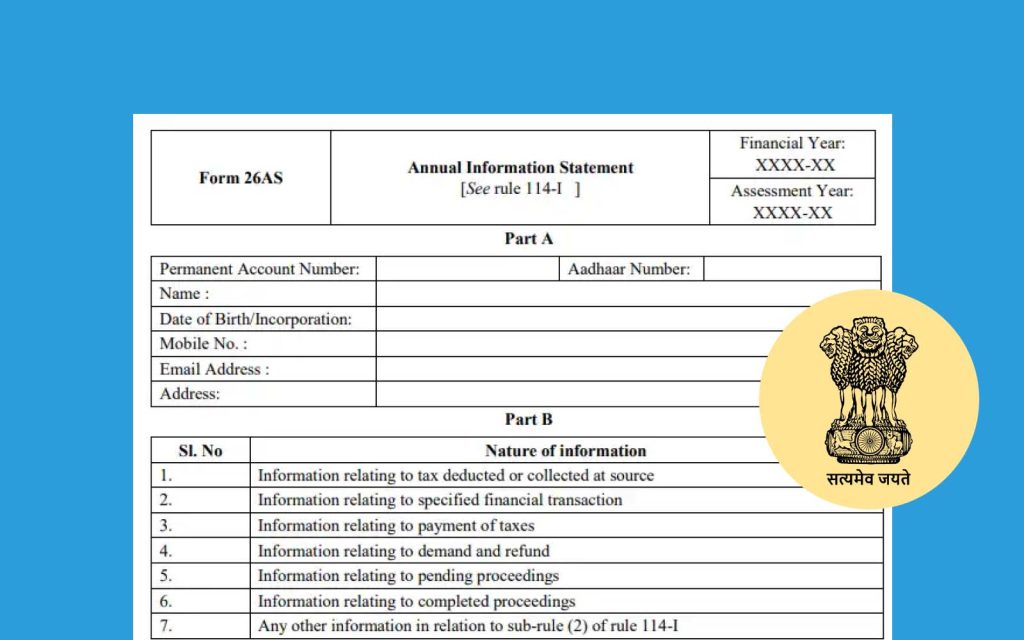
Step 2: Verify TCS Credit in Form 26AS
Your Form 26AS is an all-inclusive statement of all TCS and TDS amounts recorded under your PAN. While thinking about how to claim TCS refund on car purchase, you should ensure that TCS deducted on the car purchase is appearing correctly on this form for claiming its refund. Here’s how you may view your Form 26AS while learning how to claim TCS refund on car purchase:
- Login to the Income Tax e-filing portal at www.incometaxindiaefiling.gov.in.
Click on ‘My Account’. Select ‘View Form 26AS (Tax Credit)’.
The website will redirect you to the TRACES website, where you can view Form 26AS.
Verify that the TCS amount deducted at the time of buying the car is credited and tallied with the amount collected by the seller.
Step 3 File Income Tax Return ITR
You would be filing your ITR and including the amount of TCS taken under total tax credits. This would facilitate a refund for you on how to claim TCS refund on car purchase because it will enable the Income Tax Department to understand your liability. Here’s how you need to go about filing your ITR with TCS while learning how to claim TCS refund on car purchase:
- The type of ITR form you must use depends on the source of income. Usually, ITR-1 or ITR-2 is opted for.
Add the amount of TCS reported on Form 26AS in the tax credit section
Submit the ITR form along with other detail such as deductions, source of income, and exemptions.
Submit your ITR online. Verify within the stipulated time to complete the process
Step 4: Verify Your Bank Account for Refund
When you file your ITR, make sure all the details of bank accounts used are accurate and mapped with PAN. The approved TCS refund will be credited to this account. You can check it using the following steps:
- Tap on ‘Profile Settings’ in your income tax profile and then select ‘Pre-validate Bank Account’.
Enter bank account details for which TCS refund ought to be credited.
The income tax portal will confirm and, subsequently, accept the account when you get your bank account pre-validated.
Step 5: TCS Refund on Car Purchase
The next step on how to claim TCS refund on car purchase is, After submitting ITR and claiming TCS, Income Tax Department will process your return. If your total tax payments, including TCS, exceed the tax amount, you become eligible for a refund. What to look forward to:
- Process Time: The Income Tax Department takes around a fortnight for return processing and issuing the refund, if any.
Refund Status Check: Check the refund status at the Income Tax e-filing portal under ‘My Account’ and ‘Refund/Demand Status’
All being well, you would receive the amount of refund in the already pre-validated bank account.
Step 6: Follow-up when necessary
In case you do not get the refund within a reasonable period or face some problem in how to claim TCS refund on car purchase, you can also take the following steps:
- Call the Income Tax Department: You may call up on the help lines provided at the website of the Income Tax Department to track your refund.
Raise a Grievance: At the e-filing portal’s ‘Helpdesk’ section, you can select ‘Submit Grievance’ and describe your problem in greater detail to seek further assistance.
Additional Tips to Smoothly Receive TCS Car Purchase Refund
Here are a few tips in addition to how to claim TCS refund on car purchase, for one smooth process after all:
- Keep All Documentation: Save a copy of the TCS certificate issued by the car dealer, the invoice of the car and any further paperworks.
Regularly Monitor Form 26AS: After purchasing, check your Form 26AS at regular intervals to verify that the amount of TCS has been credited into it.
Verify PAN details: Whether your PAN is linked with all documents like the purchase of automobile and bank account
Frequently Asked Questions
1. Can TCS refund be made if I have purchased an old vehicle?
No, because you must have paid TCS on the purchase of the old vehicle if you spent over ₹10 lakhs. You can still claim TCS refund during the tax return filing.
2. TCS not reflecting in Form 26AS What to do?
The car dealer can be approached to ensure that the TCS amount has been adjusted against your PAN. Alternatively, you may seek a clarification on this matter by sending an inquiry on the income tax e-filing portal in case of a discrepancy.
3. How long will it take for me to receive the refund in respect of TCS?
At the time of ITR filing submission, the Income Tax Department takes about 1-3 months to process the refund. However, the timeline may differ.
4. How long can I expect to get my TCS refund?
Despite there not being a timeframe in which you must collect your TCS refund on car purchase, you must file ITR within the applicable assessment year.
Why You Shouldn’t Miss This TCS Refund on Car Purchase
Hence, how to claim TCS refund on car purchase will prevent you from paying too much tax, as it ensures an amount lower than what your income supports or reduces the tax liability. For high-value assets like cars, the TCS component can be quite substantial; hence, claiming a refund will be helpful in recovering that amount. Understanding how to claim TCS refund on car purchase will ensure that your tax payments are perfectly aligned with your income and liabilities.
Common Mistakes to be Avoided While Claiming TCS Reimbursement in Case of Buying a Car
- Bank Account: The reimbursement process for your ITR can get delayed due to common errors in bank account details.
Ignoring Verification of Form 26AS: If the TCS amount is not appearing on Form 26AS, claiming reimbursement would become excessively challenging.
Failed Filing: It’s quite possible that you may miss your reimbursement of TCS as you file ITR late.
Conclusion
Knowing how to claim TCS refund on car purchase will help reduce the tax burden of an individual. All that the car owner has to do is follow the proper procedures by checking Form 26AS, filing an accurate ITR, and ensuring that the bank account details are up-to-date for him to successfully claim the refund. The benefit here is not just the money saved but that your financial records will be up-to-date with respect to the taxes.
Maintain proper documentations. Complete filing. Never forget to check your refund status after you file for return. Indeed, how to claim TCS refund on car purchase is a pretty complicated process, but actually, if done step by step, it can be made. You can check other guide to know How to avoid rats in car









Leave a Reply